Table of Contents
- Why Smart Lighting Controls Matter for Holiday Displays
- What You’ll Need Before Starting
- Step 1: Choose Weather-Resistant Smart Lighting Equipment
- Step 2: Set Up Outdoor Smart Plugs for Holiday Lights
- Step 3: Install and Connect Your Smart Controller
- Holiday Lighting Scheduling Best Practices
- Protecting Smart Controls from Weather and Corrosion
- Common Mistakes to Avoid
- Frequently Asked Questions
Last Updated: September 30, 2026
Why Smart Lighting Controls Matter for Holiday Displays
Smart lighting controls holiday displays let you manage everything from your phone instead of manually flipping switches. You can turn lights on and off on a schedule, dim them during storms, or shut everything down if weather turns dangerous, saving time, reducing energy waste, and protecting your display from rain, humidity, temperature swings, and salt air.
What You’ll Need Before Starting
Smart Controller (WiFi-Enabled Hub)
This central device manages all your smart plugs and schedules via your home WiFi. Look for controllers supporting 2.4 GHz WiFi (outdoor plugs have weaker antennas and work better on this longer-range band) and at least 20 connected devices. Place it indoors near a window or on a high shelf to maximize signal strength; avoid basements, closets, and interior rooms.
Outdoor Smart Plugs Rated for Wet Locations
Indoor smart plugs will corrode and fail in moisture within weeks. Look for plugs labeled “wet location rated,” “IP65” or higher (dust-tight and protected against water jets), and “GFCI protected” (cuts power instantly if it detects a short, preventing electrocution).
Check the maximum wattage rating on the plug. Most standard outdoor smart plugs handle 15 amps at 120 volts (1,800 watts). Add up the wattage of all lights you’ll plug in, typical LED strings use 5-10 watts; incandescent strings use 40-100 watts, and don’t exceed the plug’s rated capacity.
Weather-Resistant Extension Cords (Outdoor-Grade)
Look for outdoor-rated cords with “SJTW” or “SOOW” designation, 12 AWG or thicker wire, and UV-resistant jacket. Keep outdoor cord runs under 50 feet to avoid voltage drop; if you need to reach farther, use 10 AWG wire.
Surge Protectors Designed for Exterior Use
Outdoor surge protectors have sealed outlets and weatherproof housings to protect smart equipment from power spikes. Choose one with at least 2,000 joules of protection, mount it on a wall or elevated surface (never on the ground), and ensure it has a GFCI outlet or works with a GFCI-protected circuit.
Smartphone or Tablet to Run the Control App
You’ll need a smartphone or tablet to run the manufacturer’s app. Verify iOS and Android compatibility before buying equipment.
WiFi Signal Reaching Your Display Area
This is critical and often overlooked. Weak WiFi causes dropped connections, missed schedules, and failed automations. Test your signal before buying anything.
Walk to your display location with your smartphone and open a WiFi speed test app (like Speedtest by Ookla, available free on iOS and Android). Connect to your home WiFi and run the test. You need at least 5 Mbps download speed for reliable smart plug control. If you get less than 2 Mbps, your signal is too weak.
Also check signal strength (not just speed). Open your phone’s WiFi settings and look at the signal bars next to your network name. If you see fewer than three bars, plan for a WiFi extender or mesh system before installation.
If your WiFi doesn’t reach the display, you have two options:
-
WiFi Extender: A device that picks up your existing WiFi signal and rebroadcasts it. Place it halfway between your router and the display area. Extenders are affordable (typically under fifty dollars) but reduce bandwidth slightly.
-
Mesh WiFi System: Multiple nodes that work together to blanket your home and yard in strong WiFi. More expensive than extenders but more reliable for outdoor use. If you have a large property or thick walls, mesh is worth the investment.
Waterproof Electrical Tape and Sealant
Waterproof electrical tape and polyurethane sealant are your defense against moisture. Use them to seal every cord-to-plug connection, extension cord joint, and outlet connection.
Optional but Recommended: Weatherproof Outlet Covers
These plastic shields mount over outdoor outlets and keep rain off when plugs aren’t in use, significantly extending the life of your outlet and plugs.
Checklist Before You Shop
Before purchasing, confirm your WiFi reaches the display location, your outdoor outlet is dry and functioning, you know the total wattage of all lights, your router supports 2.4 GHz WiFi, and you have a smartphone or tablet for the control app. Address any gaps first, weak WiFi or incompatible outlets will cause problems regardless of equipment quality.
Step 1: Choose Weather-Resistant Smart Lighting Equipment
For holiday displays, smart plugs are the most practical choice. They work with any light string you already own, just plug the lights into the smart plug and control it from your app with no rewiring needed.
Look for plugs rated for outdoor use in wet conditions with sealed connections and corrosion-resistant materials. Use LED light strings, which consume 80% less energy than incandescent strings, stay cool to the touch, and handle temperature swings better. Confirm your outlet provides standard 120V household current.
If you’re looking for professional help designing and installing a complete smart lighting system for your holiday display, Holiday Decorating services can handle the setup and integration, ensuring everything works seamlessly from day one.
Never use indoor smart plugs outside. They lack the sealed construction needed to handle rain and humidity. Indoor plugs will corrode within weeks and create shock hazards.
Step 2: Set Up Outdoor Smart Plugs for Holiday Lights
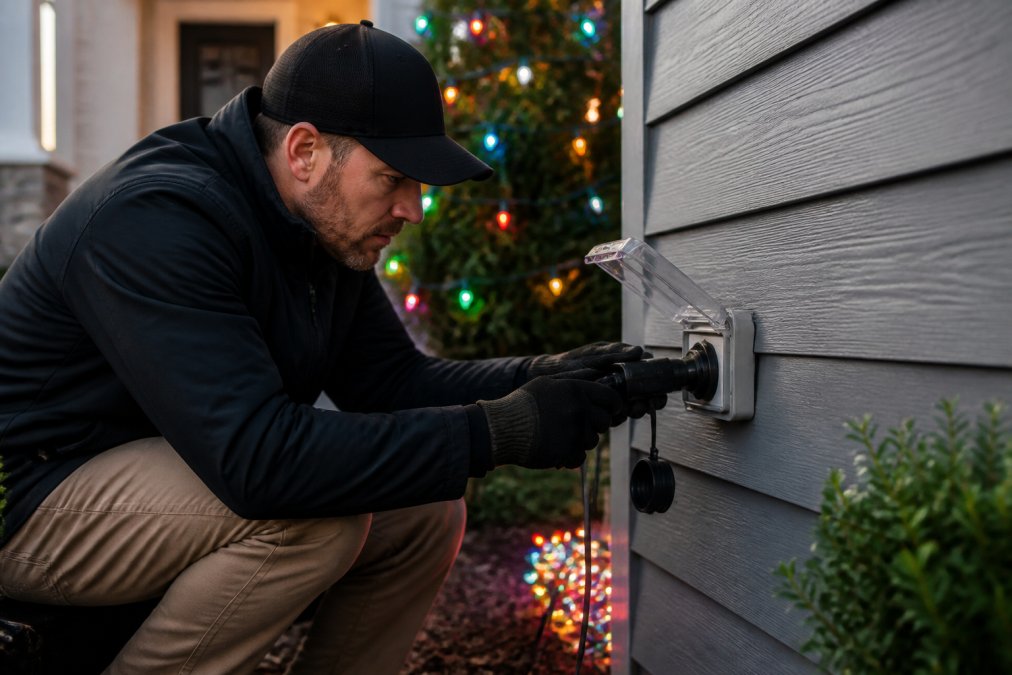
Follow these steps: (1) Choose the outlet closest to your lights to minimize voltage drop. (2) Ensure the outlet is dry and not damaged. (3) Insert the smart plug and confirm the LED indicator lights up. (4) Download the manufacturer’s app, create an account, and follow the setup wizard. (5) Select your home network and enter your WiFi password, the plug will connect within 30 seconds. (6) Name the plug descriptively (e.g., “Front Porch Lights”). (7) Connect your holiday lights to the smart plug outlet. (8) Test by toggling the plug on and off in the app.
Test your smart plug setup on a clear day before bad weather arrives. Connection problems are easier to fix in advance.
Step 3: Install and Connect Your Smart Controller
Install the WiFi-enabled controller in a central location inside your home near a window to maximize signal strength to outdoor plugs. Follow the app’s pairing instructions: power on the controller, open the app and select “Add Device,” scan the QR code, let the app search for nearby smart plugs, and select each plug to add it to the system. Once paired, all plugs appear in one dashboard where you can control them individually or create groups (e.g., “Front Displays” for porch, roofline, and pathway lights).
Holiday Lighting Scheduling Best Practices
Create a schedule that matches your needs:
- Dusk to 11 PM for weeknights (saves energy while keeping displays visible)
- Dusk to midnight on weekends (guests may be around later)
- All day on holidays (Thanksgiving through New Year’s)
- Off during storms (reduces electrical risk)
Use sunset-based scheduling instead of fixed times. The app calculates sunset for your location and adjusts automatically. Your lights stay on the same schedule year-round without manual updates.
Test your schedule for a full week before the holidays. Make sure lights turn on and off when expected. Check the app logs for any missed commands.
Protecting Smart Controls from Weather and Corrosion
Water corrodes metal contacts, causes shorts in circuit boards, and degrades insulation. Capillary action pulls moisture into tiny gaps between connectors and into solder joints on circuit boards, creating a conductive path that shorts electrical components. Metal contacts oxidize (rust), turning from shiny copper or silver to green or brown corrosion that blocks electrical flow. Temperature swings worsen this: outdoor air cooling at night causes moisture to condense on cold metal surfaces, while daytime heating creates a pump effect that draws moisture inward.
Sealing Connections: The First Line of Defense
Protecting Metal Components from Corrosion
Outlet and Plug Housing Protection
Managing Humidity in Storage and Outdoor Enclosures
Extension Cord Selection Matters
Elevation and Drainage
Monthly Inspection During the Season
Never attempt to clean corroded contacts while the plug is powered. Always turn off power at the circuit breaker first. Wet metal and electricity create shock hazards.
Climate-Specific Strategies
Common Mistakes to Avoid
Avoid these common mistakes: (1) Using indoor plugs outdoors, they lack weatherproofing and fail quickly in moisture. (2) Overloading circuits, calculate total wattage and don’t exceed 1,500 watts per outlet. (3) Ignoring WiFi signal strength, test before installation and add an extender if needed. (4) Forgetting to seal connections, seal every plug-to-cord connection with waterproof tape or sealant. (5) Ignoring schedules, review automation rules monthly as seasons and needs change. (6) Not testing before bad weather, test everything on a clear day. (7) Mixing old and new equipment, verify voltage and current ratings match.
Frequently Asked Questions
What are the best smart plugs for outdoor holiday lighting?
Look for outdoor smart plugs rated for wet locations with an IP rating of at least IP64 (water and dust resistant). They should support 2.4 GHz Wi-Fi, handle the wattage of your light strands, and work with major platforms like Alexa or Google Home. Weather-resistant construction with corrosion-resistant materials is essential for durability in humid climates. Check that the plug includes a weatherproof cover and surge protection to safeguard your lighting investment.
How do I sync multiple holiday light strands with a smart controller?
Connect each light strand to its own outdoor smart plug, then add all plugs to the same smart home app or controller. Group them into a single scene or automation so they turn on and off together. Most systems allow you to name groups (like ‘Front Porch Lights’ or ‘Roofline’), making it easy to control everything with one command. Test the sync before the holiday season to ensure all strands respond simultaneously.
Can smart lighting controls handle high-wattage holiday displays?
Standard outdoor smart plugs typically handle 15 amps (1800 watts), which covers most residential holiday displays. For larger commercial properties or multiple high-wattage strands, use heavy-duty outdoor smart plugs rated for 20 amps or install a dedicated smart breaker. Always check the wattage of your entire display setup before purchasing controls. If you’re unsure about capacity, consult with a professional installer to avoid overloading circuits.
How do I protect smart lighting controllers from weather damage?
Install outdoor smart plugs in weatherproof outlet boxes or use GFCI-protected outlets under covered areas like eaves or porches. Apply polyurethane sealant around the plug connections to prevent moisture intrusion. Store wireless controllers indoors during extreme weather. For permanent installations, consider a weather-resistant enclosure rated for your climate. Regular maintenance, cleaning connections and checking for corrosion, extends the life of your smart controls significantly.
Smart lighting controls for holiday displays give you peace of mind and save time every year. Houston Light specializes in weather-resistant holiday lighting installations that integrate seamlessly with smart home systems. Our team handles everything from equipment selection to final testing, ensuring your display runs reliably through the entire season. Get a FREE estimate and let us design a custom smart lighting solution for your home or business.